Last quarter, I audited 47 AI workflows across different teams and roles.
88% of them were stuck at the same level.
Not because of tools. Not because of budget. Because of a mental model error.
They were automating nothing. They were prompting everything.
There is a real progression to how AI gets used in practice. It runs across three levels. Each level delivers a different order-of-magnitude increase in time savings, output quality, and system reliability.
Level 1: Prompt. You ask, AI answers. Manual, one-at-a-time, context dies when the tab closes.
Level 2: Pipeline. AI executes a sequence. Structured inputs, predictable outputs, repeatable results.
Level 3: Agent. AI makes decisions and acts. Tool access, memory, multi-step autonomy within defined bounds.
Most people never move past Level 1.
I was stuck there too, for longer than I want to admit. The shift happened when I stopped trying to write better prompts and started designing systems.
Here is the breakdown of all three levels — what they look like in practice, where people get stuck, and the specific things I changed to move from one level to the next.
The Problem With Calling Everything Automation
The average knowledge worker using AI daily is getting about 20% of what the tool is capable of delivering.
The estimate is not a guess. I calculated it by looking at my own usage logs before and after I redesigned my workflow.
Before: I was opening Claude, typing a question, reading the answer, closing the tab. Repeat. 40 times a day.
After: 6 automated pipelines handle roughly 70% of the same volume. I interact with outputs, not inputs.
The difference between those two states is not a better model. It is not a longer prompt. It is the level of AI use.
The confusion starts with what people call “automation.”
When someone says they use AI to automate their content creation, they usually mean they type a prompt and get a draft. The description is not automation. It is a faster typewriter.
Real automation removes your hands from the process. AI makes the decisions. AI calls the tools. AI delivers the output. You review and approve.
I watched a marketing manager spend 3 hours a week copying and pasting content from a Google Doc into Claude, generating social posts, then copying those back into a spreadsheet. She called it her AI workflow. She had been doing it for 8 months.
When I asked what would happen if she got sick for a week, she said “it would all pile up.”
A system does not pile up. A manual process does.
The three levels I am describing are not marketing categories. They are architectural differences in how AI systems get designed and operated. Each one requires a different skillset, different tooling, and a different way of thinking about what AI is for.
Level 1: Prompt
Level 1 is where everyone starts. It is also where most people stay.
The defining characteristic of Level 1 is manual initiation. Every AI interaction starts with a human typing something. AI responds. Human reads. Done.
There is nothing wrong with Level 1. For ad-hoc questions, quick research, and writing assistance, it works. A surgeon does not need an automated pipeline to answer a one-off medical question.
The problem is when people mistake Level 1 for a system.
The marketing manager I mentioned was not unusual. She was the norm. Most people who describe themselves as “using AI in their workflow” are at Level 1 — initiating every interaction manually, re-explaining context every session, and treating chat history as their archive.
The signals you are stuck at Level 1:
- Every AI interaction requires you to initiate it manually
- Context resets every session — you re-explain your preferences and formats each time
- Output lives in the conversation — no downstream system receives it automatically
- If you stopped typing, nothing would happen
- Time savings cap out around 25–30%
The 25–30% figure is the ceiling. At Level 1, you are removing research and writing time, but not decision-making time. You are still the operator. AI extends your capacity but does not replace your process.
The fix is not to write longer prompts. I tried it. It did not move the ceiling.
The fix is to ask a different question: what am I doing manually with AI more than three times per week and what are the steps I follow every time?
Answering the question leads to Level 2.
Level 2: Pipeline
A pipeline is a sequence of AI operations running on structured inputs and producing structured outputs.
I built my first real pipeline in January 2025. I was writing 3–4 research summaries per week. Each one followed the same structure: read source, extract key points, write summary, format for distribution.
I was spending 40 minutes per summary. After I built a Claude pipeline taking a URL as input and producing a formatted research note, the same output came in under 4 minutes. Same quality. No manual steps mid-process.
This is Level 2.
The defining characteristic of Level 2 is repeatability. You define the process once. AI executes it every time. Same inputs, same process, predictable output range.
What Level 2 requires from you:
- Structured inputs: the data going into the pipeline needs to be consistent in format
- Prompt templates: the instructions to AI are fixed and documented, not improvised each run
- Output schemas: the format of what comes out is defined in advance
- A trigger: something starts the pipeline (a new file, a scheduled time, a form submission, an API call)
The tools making Level 2 work: Claude Projects for context, n8n or Make for orchestration, any workflow automation layer passing data between steps.
The common mistake at Level 2 is treating pipelines as one-off tools instead of infrastructure.
I built 12 pipelines before I realized I was maintaining 12 isolated things instead of one coherent system. Each one had its own instructions, its own context, its own quirks. When I redesigned with a shared memory layer — a single knowledge base feeding multiple pipelines — maintenance time dropped by 60%.
The time savings at Level 2 run 40–60% for the processes it covers. But there is a ceiling here too.
When pipelines break, you find the gaps: edge cases the system does not handle, decisions requiring judgment calls, outputs depending on context too variable to template. The decision points you are still making manually are the marker.
The ceiling of Level 2 is the ceiling of fixed sequences.
Level 3: Agent
An agent is an AI system making decisions, calling tools, and operating across multiple steps without human input at each step.
This is not a chatbot with memory. An agent reads a situation, decides what to do, takes an action, reads the result of the action, and decides what to do next.
I shipped my first real agent in March 2025. It monitors my content pipeline, identifies articles needing updates based on new information arriving from my research sources, drafts the update, and flags it for my review. It runs on a schedule. I spend 10 minutes per week interacting with it.
Without it, the same process took 6 hours per week.
The defining characteristic of Level 3 is conditional execution. The agent does not follow a fixed sequence. It reads state, evaluates conditions, and chooses a path.
What Level 3 requires:
- Tool access: the agent calls APIs, reads files, writes to databases
- Decision logic: the agent has defined criteria for choosing between options
- Error handling: the agent has defined behavior for failure states
- Scope limits: the agent has explicit constraints on what it is and is not allowed to do
- A memory layer: the agent maintains state across sessions
The tools making Level 3 work: MCP (Model Context Protocol) is the key infrastructure. Claude’s agent APIs. Any tool integration layer where AI is the decision-maker, not the form-filler.
The shift is moving from “AI fills out a template” to “AI decides which template to use, fills it out, and routes the output.”
Level 3 is not appropriate for every process. I run 4 agents at the moment. Everything else is still Level 1 or Level 2. The question is not “how do I make everything an agent?” The question is “which 3 processes in my workflow have the highest value and the clearest decision rules?”
One thing I did not anticipate: scope creep.
The content update agent I built in January had added 3 extra steps by April. None of them were wrong. All of them were unauthorized. The model updated, the agent adapted, and the scope drifted. Monthly agent audits are now part of my maintenance routine.
At Level 3, AI replaces your judgment on defined decisions. You set the rules, monitor the outcomes, and adjust the system.
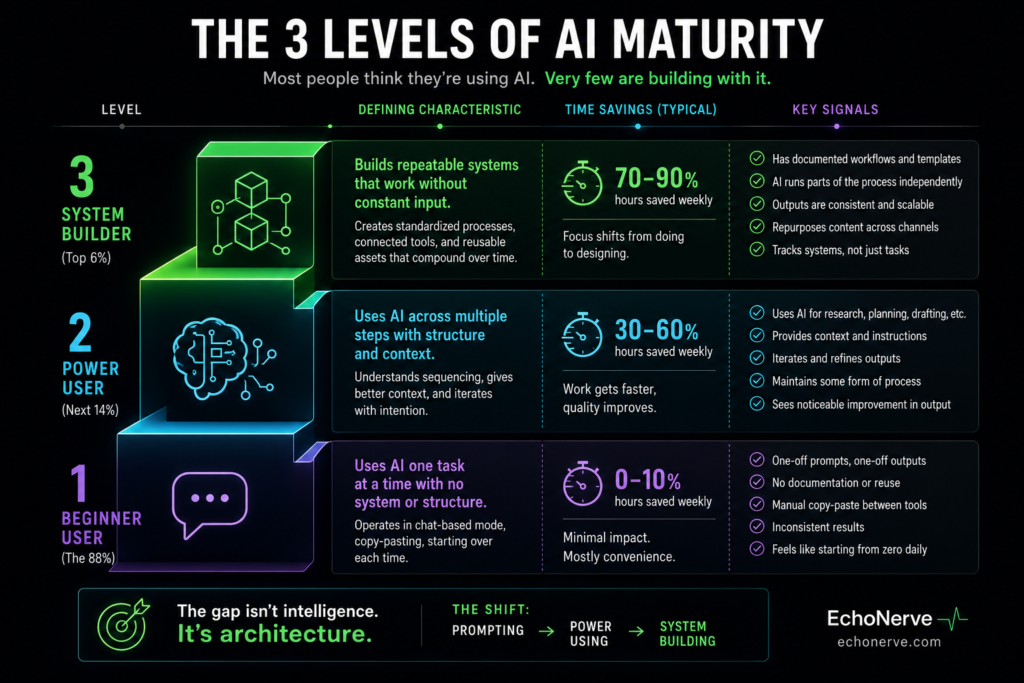
Where Do You Sit?
Here is a short diagnostic. Answer these four questions.
1. If you did not open Claude tomorrow, how much of your AI-assisted work would still happen?
- None → Level 1
- Some (the parts with scheduled triggers) → Level 2
- Most (agents run, exceptions get flagged to you) → Level 3
2. Where do your AI outputs land?
- In the chat window → Level 1
- In a document or spreadsheet you check → Level 2
- In a downstream system automatically → Level 3
3. How often do you re-explain your context to AI?
- Every session → Level 1
- Rarely (Projects or templates hold it) → Level 2
- Almost never (memory layer maintains it) → Level 3
4. What does your AI time ratio look like?
- 80% input (typing prompts), 20% review → Level 1
- 40% setup and maintenance, 60% reviewing outputs → Level 2
- 20% system design, 80% reviewing outputs and exceptions → Level 3
Most people reading this will land at Level 1. A smaller group will be in early Level 2. Level 3 is genuinely rare — I know roughly a dozen people in my network running real agents in production for their own work, not as a demo.
The goal is not to reach Level 3 tomorrow. The goal is to identify one process at your current level ready to move up, and run the experiment.
Three Starting Points for Moving Up
If you are at Level 1 and want to move to Level 2:
Pick one task you do with AI more than three times per week. Document the steps — write them out in order. Turn those steps into a fixed prompt template inside a Claude Project. Add your context, preferences, and output format to the project instructions. Run the same task five times using the template and measure the time delta.
I did this with my research note process. First run: 40 minutes. After templating and putting it in a Project: 8 minutes. One change justified everything I built after it.
If you are at Level 2 and want to move to Level 3:
Identify a pipeline with a decision point — a step where you are currently the one choosing between two options. Write out the decision criteria in plain language. Map those criteria into conditional logic in your automation layer. Let the system make the call for one week, then review the outcomes.
The decision criteria are usually simpler than they feel. My content update agent uses 4 conditions. The first version had 11 — I cut the ones the agent consistently got right without explicit rules.
If you are already at Level 3:
Audit your agents for scope creep. Every month, I review what each agent is doing versus what I designed it to do. Systems expand their own behavior over time, especially when the underlying model gets updated.
Set a monthly calendar block. Open each agent. Check what it did last week against what you built it to do. Adjust the scope limits before drift compounds.
The Real Progression
The three levels are not aspirational categories. They are descriptions of how AI gets embedded into a working system.
Level 1 scales your output. You type less, produce more.
Level 2 scales your process. The process runs without you.
Level 3 scales your judgment. The system makes the calls you would have made.
The reason most people stay stuck at Level 1 is not capability. It is the absence of a framework for moving forward. No one taught them what a pipeline looks like. No one showed them where agent architecture starts.
I know this because I built all three levels myself, made the mistakes at each stage, and spent two years figuring out what the progression looks like in practice. Not in theory. In systems running production workloads.
Deep Stack covers exactly this.
Deep Stack is a structured program for people building AI systems — the ones who want to move from ad-hoc AI use to production-grade systems. It covers pipeline design, agent architecture, memory systems, and tool integration with the model and connector stack I use every day.
If you read this and recognized your Level 1 patterns, Deep Stack is where to start.
[echonerve.com/deep-stack]