Six months ago, integrating a tool into an AI workflow meant writing a wrapper.
You fetched data through an API, formatted it, injected it into a prompt, and hoped the model used it correctly. The connection was manual. The AI was passive. The developer stood between the tool and the model at every step.
MCP changed the architecture entirely. Not gradually — in about 90 days it became the default connection layer inside every serious AI system I know of, including the one running this publication.
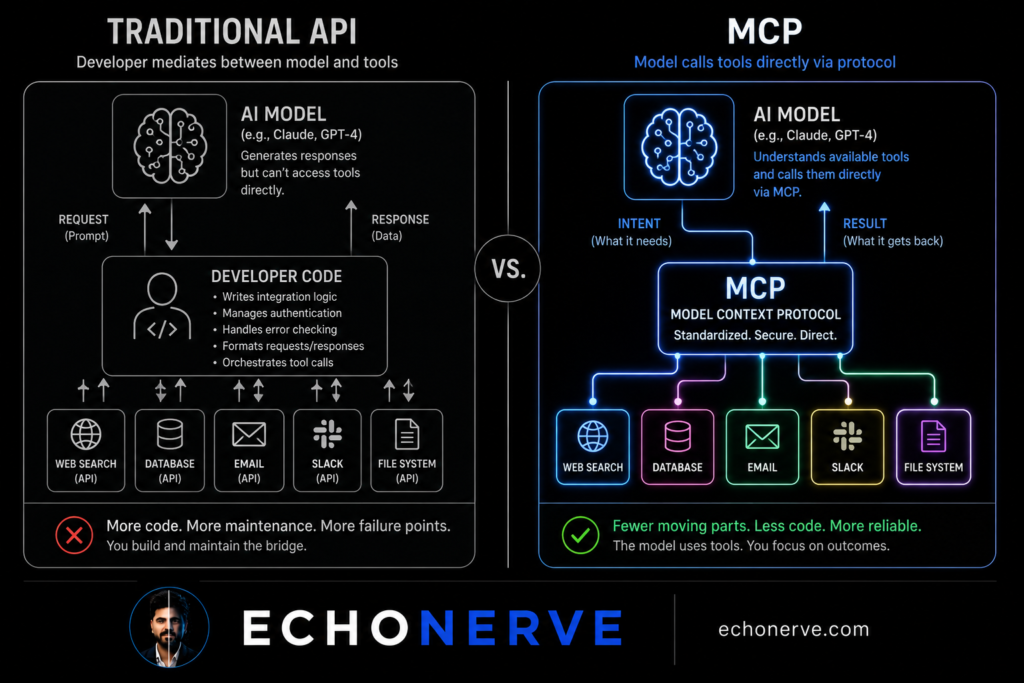
The shift is architectural, not incremental. Traditional APIs are request-response: a system asks for data, data comes back, and a human or developer code decides what to do with it. MCP inverts this. The AI decides which tools to call, when to call them, and what to do with the results. The developer defines the tools. The model uses them.
I rebuilt three workflows after MCP became stable. The difference in what I built — and how fast — was not marginal. The time-to-working-system comparison was embarrassing for the old approach.
Here is the architectural shift, explained specifically enough to build from.
How Traditional APIs Work — and Where They Break
Most AI integrations built in 2023 and 2024 follow the same pattern.
A developer writes code to call an external API. The API returns data. The developer’s code formats the data and injects it into a prompt. The model processes the prompt and produces output. The developer’s code parses the output and decides the next step.
The developer — or their code — is the connector between every component.
This works. Millions of systems run this way. The limitations accumulate fast when you try to build anything with scope.
Problem 1: Static routing.
The developer decides in advance which APIs to call and when. The model has no mechanism to say “I need current pricing data for this analysis” and go get it. It either has the data or it does not. Capability is fixed at build time.
Problem 2: Context injection bottleneck.
Every new data source requires new developer code to fetch, format, and inject. Adding a third data source to a two-source system is not a small addition. It is another integration to maintain, another formatter to write, another point of failure.
Problem 3: Brittle schema coupling.
APIs return data in their own format. The developer writes transformation code to turn API output into something the model handles well. When the API changes its response schema — and they do — the integration breaks. Not the API call. The formatter downstream.
Problem 4: Sequential execution only.
Traditional API integrations process in sequence: step 1, step 2, step 3. There is no native mechanism for a model to call three tools in parallel based on what it needs simultaneously. Everything waits for everything.
I ran into all four of these problems building a competitive intelligence system in early 2024. The system called four APIs, formatted each response differently, and injected them into a single 4,000-token prompt. It worked. It took two full weeks to build and three additional weeks to reach stable production quality.
When I rebuilt the same system with MCP in late 2025, it took three days.
The two-week build was not because I was learning. I knew exactly what I was doing. The three-day rebuild was not because I was faster. It was because the architecture stopped making me write glue code between every piece.
What MCP Changes
MCP — Model Context Protocol — is not a new kind of API. It is a protocol for AI models to discover and call tools autonomously.
The key difference is who controls the connection.
In a traditional integration, the developer writes code controlling which tools get called, when, and with what parameters. The model is passive. It receives whatever context the developer decided to provide.
In an MCP system, the model sees a list of available tools and decides which ones to call, in what order, with what parameters. The developer defines the tools. The model reasons about which ones it needs.
This shift has four concrete effects on how systems behave.
1. Tools are composable, not custom-integrated.
A tool in an MCP system is a described capability: name, description, input parameters, output format. Any agent with MCP support calls it. You build a tool once. Any workflow picks it up from the tool registry.
In a traditional setup, integrating the same data source into two different workflows means writing integration code twice — or maintaining a shared library with all its dependency overhead. In MCP, you expose the tool once and every agent discovers it automatically.
2. The model chooses its own context.
Traditional systems pre-load context into a prompt. The model gets what the developer decided it needs. If the developer missed something, the model works without it.
In MCP, the model requests tools when it needs them. It calls a search tool when it needs current information. It calls a file tool when it needs to read something. It calls a database tool when a query matters. It is not limited to what was pre-loaded at session start.
This changes how AI systems behave under complex, open-ended tasks. The model is no longer dependent on the developer having anticipated every data need in advance.
3. Error handling is localized.
In a traditional multi-step pipeline, an API failure at step 2 breaks everything downstream. The step 3 code runs without the data it expected. Errors cascade.
In an MCP system, a tool failure returns a structured error to the model. The model decides whether to retry, use an alternative tool, or proceed without the data. The system is more resilient not because the developer wrote better error handling. The model handles errors as part of its reasoning.
4. Deployment is standardized.
Every MCP tool follows the same protocol: the same connection format, the same discovery mechanism, the same invocation pattern. A tool built for one system deploys to another system without modification.
In 2024, I maintained three separate integration layers for the same data sources across three different projects. Each project had its own API wrapper code, its own formatter, its own error handling. Updating one source meant updating three codebases.
In 2026, I maintain one MCP tool server. All three projects connect to the same tools via the same protocol. Updating one source means updating one tool definition. The three projects never know anything changed.
What Changes in Practice — Three Rebuilt Workflows
Before and after, with specific numbers.
Research digest pipeline
Before: A Python script called five RSS feeds, ran each response through a custom formatter, combined the results into a Markdown block, and injected it into a Claude prompt. Adding a sixth source meant modifying the script, writing a new formatter, and testing the combined output for prompt length. Each addition took 3–4 hours.
After: Claude calls a fetch_feed tool when it needs new articles. I added a search_arxiv tool last month. Claude started using it immediately. No pipeline modification. No new formatting code. The model discovered the tool, read its description, and integrated it into its research workflow.
The development cost of adding a new source dropped from 3–4 hours to 20 minutes of tool definition writing.
Competitive intelligence system
Before: Four APIs. Four formatting functions. One combined 4,000-token prompt. When one API changed its response schema in March 2024, the combined formatter broke and the entire system went down. Diagnosis took 40 minutes. Fix took 3 hours. Two more schema changes followed the same year.
After: Four MCP tools. The model calls each independently when relevant — company lookup, news search, headcount history, open positions. When the employee count API changed its schema in February 2026, I updated one tool definition. Nothing else broke. Diagnosis time: 8 minutes. Fix time: 25 minutes.
The architectural change did not make the API more reliable. It made the system resilient to unreliability.
Content research agent
Before: I manually collected sources, pasted them into a document, and handed the document to Claude. The model worked from whatever I remembered to include. If I missed an important source, the research brief reflected the gap.
After: The research agent calls web_search, fetch_page, and read_file tools based on what it determines relevant for each topic. I give it a topic. It builds its own source base. My role shifted from collecting sources to reviewing the brief.
Time per research session: 45 minutes (before) → 8 minutes of review (after).
The output quality also improved. The model selects sources based on relevance to its task. I selected sources based on what I remembered and what I had time to find. These are not the same selection criteria.
Self-Diagnostic: Are You Still in the API Era?
Eight questions. Answer based on your current AI systems.
Do you write code to pre-load context into every AI prompt, or does the model request what it needs?
When you add a new data source to a workflow, do you modify pipeline code or register a new tool?
Are your integrations coupled — where one API failure breaks the whole workflow?
Do you maintain separate integration code for the same data sources across different projects?
Does your model call external tools during reasoning, or does it only process what you gave it before the session started?
When a downstream API changes its schema, does your pipeline break?
Do you have a tool registry — a defined set of capabilities your agents share?
Have you deployed any MCP server, or is MCP still something you have only read about?
Scoring:
0–2 yes (to the MCP-positive questions): You are operating on traditional API architecture. This is functional. It is also the ceiling.
3–5 yes: You are transitioning. The instincts are in the right direction — the implementation is not complete yet.
6–8 yes: You are building with MCP-native patterns. The integration overhead you used to accept is no longer standard in your workflow.
The traditional API model is not broken. It produces real systems. The question is whether you want the ceiling it sets — fixed tool selection, manual context injection, brittle schema coupling — or whether you want to build systems where the model reasons about which tools it needs and calls them directly.
Most people I know who have rebuilt one workflow with MCP do not go back. Not because MCP is elegant in theory. Because the build time difference is undeniable in practice.
Three Starting Points
1. Expose one tool you currently hardcode.
Pick one data source your current AI system fetches via script. Write one MCP tool definition for it: name, description, parameters, return format.
Do not rebuild the whole system. Replace one hardcoded API call with one MCP tool. Run both versions on the same 10 inputs and compare the model’s behavior when it requests data versus when data is pre-loaded.
This single comparison will teach you more about MCP than a week of reading documentation. The model’s reasoning about when and why to call a tool is visible in its outputs. It is not visible in any spec.
2. Build a three-tool server.
Three tools: a web search tool, a file read tool, and one domain-specific tool relevant to your work — a database lookup, a news feed fetch, a Notion page reader.
Connect them to one Claude session. Watch which tools the model calls and when. Watch how it handles a tool failure. Watch how it combines results from two tools in a single reasoning step.
Thirty minutes of hands-on observation teaches the decision-making patterns faster than any documentation. The patterns are not obvious from reading the protocol spec. They become obvious immediately when you see them running.
3. Read the MCP specification directly.
The official MCP specification at modelcontextprotocol.io is approximately 40 pages. Most of it is readable in two hours.
Most builders I know who work with MCP learned the tool discovery mechanism and the tool invocation pattern and stopped there. Reading the full spec gives you the error handling patterns, the sampling protocol, and the resource definitions — the parts where the real architectural advantages live and where most MCP implementations are incomplete.
Two hours of reading gives you access to patterns most MCP builders skip entirely. The patterns show up later as failure modes in systems built without them.
The Architecture Is the Advantage
MCP is not a feature. It is a new architecture for how AI systems connect to the world.
The builders getting the fastest iteration cycles and the most resilient systems are not using better models than you. They are using better architecture. Tools defined once and shared. Models requesting context rather than receiving it. Error handling localized at the tool level rather than cascading through a pipeline.
I built Deep Stack to give you the protocol-level depth behind production AI systems — not overview content, but the actual spec analysis, working tool configurations, and the architectural tradeoffs builders hit in week three and beyond.
If you are serious about building AI systems with MCP — not only using it, but understanding why it works the way it does — Deep Stack is where the depth lives.
[Join Deep Stack → echonerve.com/programs/deep-stack/]
Internal links: MCP Explained 2026 — AI Agents Decoded 2026 — Stop Explaining Yourself to AI — Complete Guide to Claude Chat, Cowork, Code