The $120 a month. Five tools. And I was getting real work done with one of them.
Last month I paid $20. My output did not drop. In three areas, it improved.
This is not a “free tools are better” argument. Free is not the point. The point is the gap between what I was paying for and what I was using. When I wrote down the actual usage numbers, I found I had been spending $65 a month to keep subscriptions I barely opened. Not because I was careless — because I had convinced myself each one was earning its place.
The audit took a week. Not because the data was complex, but because it was uncomfortable. Cancelling something you told yourself you needed feels like admitting a mistake. It is not. It was the first rational decision I made about my AI stack in two years.
I was paying for 5 tools. When I wrote down how often I used each one, I found I was using 1 of them every day, 1 a few times a week, and the rest once a month at most, if at all. The $20 I kept was not a downgrade. It was the only tool doing real work the whole time.
Here is exactly what I cut, what passed, and what happened to my output when I stripped the stack down.
What $120/Month of AI Tools Looked Like
I was paying for five tools. Four of them felt essential when I signed up. None of them earned it once I looked at my actual usage.
Here is what I had running:
| Tool | Monthly Cost | Stated Purpose | Actual Usage |
|---|---|---|---|
| ChatGPT Plus | $20 | General AI assistant | 2–3 times per week |
| Grammarly Premium | $12 | Writing quality / grammar | Most days |
| Jasper | $49 | Marketing copy generation | Once or twice per month |
| Notion AI | $16 | Notes summarisation | Rarely — weekly at best |
| Total | ~$97/month |
During months where I had all four active alongside a short-term trial of a fifth tool, the total crossed $120. The table above shows the recurring stack once things settled.
The “actual usage” column told a story I did not want to see.
I used 2 of the 5 tools regularly. Grammarly was open most days. ChatGPT I used a few times a week. The other three — Jasper, Notion AI, and whatever else ran alongside them — I was opening once or twice a month, if I remembered they existed.
$65 a month went to tools I was not using.
I had justified each of them at signup with some version of: “I might need this for content work.”
The phrase — “I might need this” — is where most AI spending goes to die. It is not usage. It is insurance against FOMO. And it costs $65 a month to carry.
The worst part: I had never put this list together before. The subscriptions were on different billing dates, charged to different cards in some cases. I had never added them up in one place. If you have not done this exercise, your own number is likely higher than you expect.
The Audit — How I Decided What to Cut
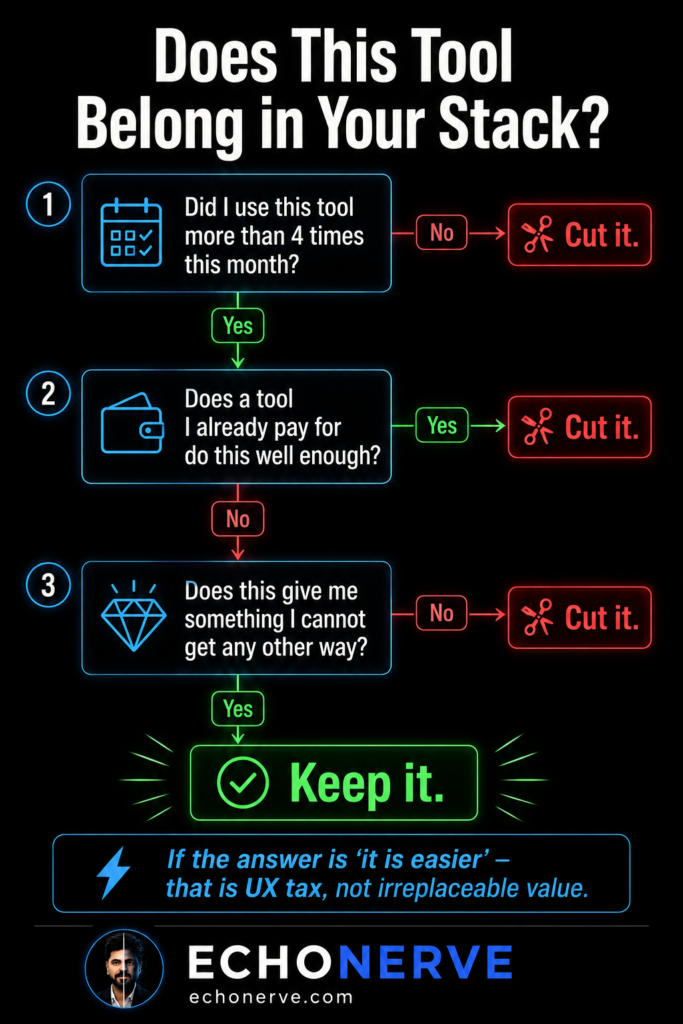
I ran three questions on every tool in the stack. If a tool failed any one of them, it went.
Question 1: Did I use this tool more than four times last month?
Not “did I log in” — did I do actual work inside it. Four uses is a low bar. If a tool is not crossing it, it is occupying billing cycle space without contributing anything. Not pause. Cut.
Question 2: Does a tool I already pay for do this well enough?
“Well enough” is the phrase most people skip. They compare tools on maximum capability. I started comparing on minimum necessary output. 90% of what Jasper does, Claude does better if you write a proper system prompt. Not comparable — better. More specific, more consistent, more on-voice. The question stopped being “which tool is best” and started being “do I need this one if I already pay for one doing the same work.”
Question 3: Does this give me something I cannot get any other way?
This is where most tools fail the audit. “It is easier” is not a pass. “Nice interface” is not a pass. If what a tool delivers is available elsewhere with slightly more effort, the difference is UX tax, not irreplaceable value.
Here is how each tool performed:
Jasper — $49/month. Cut.
I was using Jasper for marketing copy. When I built a system prompt in Claude with my brand voice rules and my EchoNerve writing style guide, the output was better than what Jasper produced. Not slightly better. Better in specificity, in consistency, in tone. I have not opened Jasper since. The $49 was paying for a workflow I had already replaced without noticing.
ChatGPT Plus — $20/month. Cut.
I stopped needing it when I switched to Claude as my primary tool. The long context and writing quality in Claude removed the reasons I kept returning to GPT-4. I held onto the subscription for two weeks after switching as a precaution. Never opened it. Cut.
Notion AI — $16/month. Cut.
I use Notion for notes. Notion AI came as an add-on. The reality: I was going directly to Claude for every summarisation and synthesis task I would have sent to Notion AI. I was paying $16 a month to access a feature I was bypassing every single time.
Grammarly — $12/month. Cut last.
This was the one I held onto longest. Grammarly caught real errors. I ran an honest test: Claude with a proofreading system prompt versus Grammarly Premium. Claude caught more errors, explained the reasoning behind each suggestion, and adjusted to my voice rather than pushing toward generic clarity. I cancelled after the test.
The $20 Stack — What It Contains
Claude Pro — $20/month.
This is the entire active stack for 90% of my work.
What it covers:
- Long-context document analysis — reading full research documents in a single session
- Article drafting in EchoNerve voice using system prompts and saved style rules
- Code assistance through Claude Code for automation and workflow scripts
- Research synthesis — extracting patterns and structure from multiple sources at once
- Cowork for file-based workflows: reading, editing, and building across documents
What it replaced: a writing tool, a marketing copy tool, a grammar checker, a summarisation add-on, and a general-purpose chat model.
I did not lose capability. I lost fragmentation.
Free tools complementing the stack:
For web research, Perplexity’s free tier is sufficient for most lookups. For quick data pulls and spreadsheet work, Sheets handles what I was routing to paid tools. For note-taking, Notion’s free tier without the AI add-on does what I need.
Total additional cost: $0.
What I genuinely miss:
Grammarly’s inline browser editing was faster than opening a separate chat window. When editing directly in a CMS or email client, the inline correction workflow was tighter. I have not replaced it with anything equivalent. The workaround is to draft in Claude and paste in — which adds a step.
Worth naming it. The $12 saved is not pure upside. There is one real tradeoff, and I made the decision knowing it.
What I Got Back Worth More Than Tools
Cutting the stack returned more than $100 a month. The less obvious returns took a few weeks to notice.
1. Clarity on what AI does for my work.
When I had five tools running, I told myself I was using AI heavily. The usage data said otherwise. When I moved to one tool, I had to be precise about what I needed from it. Precision forced better prompting. Better prompting produced better output. The constraint was the improvement.
2. Better prompting, faster.
The time I had been spending logging into separate dashboards — Jasper for copy, Grammarly for editing, ChatGPT for overflow — I spent learning Claude’s context system instead. How to set up projects. How to write system prompts. How to persist brand voice rules across sessions. The investment in depth beat any feature any of the cut tools offered.
3. Signal clarity on new tools.
When I had five tools, every new tool launch looked like a potential upgrade. There was no clean baseline. Now when a new AI tool launches, I know exactly what I have. I evaluate whether it adds something my current stack does not do — not whether it seems useful in isolation.
Three tools launched in the past 30 days. Six months ago I would have trialled all three. None of them passed the three questions.
The AI tool market launches 3–5 new tools per week. Without a clean baseline, every launch looks like a decision. With one, most of them are not.
The Framework — How to Run This Audit on Your Own Stack
The audit is not complex. Running it with full honesty is the hard part.
Step 1. List every AI tool you pay for. Include annual subscriptions divided by 12. Include add-ons buried inside larger subscriptions.
Step 2. For each tool, write the actual use frequency from memory — before checking any usage data. Memory is the more honest signal. If you cannot remember using it, you are not using it.
Step 3. Apply Question 1: more than four uses last month? If no — cut. Not pause. Cut.
Step 4. For tools passing Question 1: apply Question 2. Does a tool you already pay for do this well enough? If yes — cut the redundant one.
Step 5. For tools passing Question 2: apply Question 3. Does this give you something you cannot get any other way? “It is easier” is not an answer. A specific, irreplaceable output is.
Step 6. Run the stripped stack for 30 days before adding anything back.
Step 7. After 30 days: the things you genuinely missed are worth reconsidering. The things you forgot about are gone.
The rule on additions: do not add a tool back unless it passes all three questions in your live workflow — not in a demo, not in a free trial, not in theory.
The Ongoing Problem
The $120 stack was not wrong.
It was a phase — the “explore everything” phase every serious AI user goes through. You sign up for everything, test everything, and tell yourself you are building a system. What you are building is a subscription list.
The $20 stack is not the destination either.
The market is not stable. Models improve. New tools earn a genuine spot in a stack, then lose it six months later when something better ships for free. The tool I cut yesterday was worth paying for eighteen months ago. The tool worth paying for eighteen months from now does not exist yet.
This is the problem Signal Engine solves. I do the ongoing evaluation so you do not have to run this audit every month on your own.
Every month, Signal Engine delivers:
— What is worth adding to your stack right now
— What has been replaced and should be cut
— The one change improving your output more than any new subscription
The audit in this article took me a week to run with full honesty.
Signal Engine delivers the same signal every month, in 10 minutes.
Join Signal Engine → echonerve.com/programs/signal-engine/
Related reading: The Free AI Stack I’d Use From Zero — 7 Free AI Habits — Complete Guide to Claude Chat, Cowork, Code